Welcome!

Welcome! Thank you for visiting the Video Voice Speech Training System blog. Our goal here is to provide a forum for sharing ideas about using this exciting speech development tool, learning about new enhancements to the program, and stimulating interaction between people who are already using Video Voice or who are considering it for their speech therapy needs.  Please join us and share your experiences, ask questions, or make suggestions for new features or capabilities. We're here to listen as well as talk!

To learn more about this innovative speech therapy aid or download a Free Trial, visit www.videovoice.com.

Showing posts with label customize operation. Show all posts

Monday, April 29, 2013

What's New? Version 3.0.128 Has Launched!

Long time, no blog...  Perhaps you thought we'd dropped off the face of the earth.  Nothing could be farther from the truth.  We've been busy for a number of months working on the recent release of Video Voice Version 3.0.128.  Just when we were about ready to release it last fall, Microsoft threw us a bit of a curve ball with their own release of the new Windows 8 operating system.  If you have tried it, you know that it's very different from earlier versions of Windows!  Rather than release the new version with unknown compatibility, we spent the next several months making sure Video Voice will operate correctly on this new platform.

Now, FINALLY, we're happy to announce the release Version 3.0.128.  In addition to Windows 8 compatibility and all its previous, fabulous features and capabilities, Video Voice 3.0 now includes:

  • Fundamental frequency measurement to complement other Assessment capabilities.
  • Customization of on-screen reward text and other prompts to correspond with user-modified audios to personalize the therapy experience
  • Enhanced trace operation in the Multi-Frequency Formant Spectral Display to make it easier to capture sounds for practice, opening up potential for work on minimal pairs, in addition to high frequency sounds and more
  • Goal scoring in the Formant Multi-Frequency Gobble game to make display more effective for therapy use
  • F2/F1 and Multi-Frequency (F3/F2) Gobble display access directly from Formant Menu to make reaching this powerful feedback mode easier.
  • Simultaneous display of pitch and volume in P-A-R Connected Speech, with volume shown as peaks and pitch in spectrum colors
  • New Streaming Speech P-A-R display, provides live, "marching" display of pitch, volume, or both volume and pitch (as color) 
  • New Fun & Games 12-Pack, a lower price option for those with limited budgets or interest only in game practice options
  • Price reduction on all other software packages
  • Revised internal documentation (Help) with more internal links to relevant pages
  • Improved Windows 7 operation

There are numerous benefits to purchasing the Video Voice Speech Training System.  The most important one is the change the displays and games bring to the therapy process - helping individuals feel more in charge of their speech skills.  Another significant benefit is that software updates are FREE.  As we add new features and capabilities, you may download and install a new copy at no additional cost.

Already an Authorized User?  Please visit www.videovoice.com/vv_curel.htm to download Version 3.0.128 and update your Video Voice software.    

Haven't yet made the investment in this valuable tool for your speech therapy activities?  What are you waiting for?  Download Video Voice 3.0 and try it for 30 days, with absolutely no charge, at www.videovoice.com/vv_demo.htm.

We'll be back soon to tell you more about some of these new capabilities and offer more thoughts on how visual feedback can accelerate the therapy process.  Meanwhile, have questions?  Need assistance with using Video Voice with your caseload?  Want to restart a free trial you previously used to evaluate Video Voice's potential for your therapy needs?  Just pick up the phone and give us a call, or send an email.  We'd love to hear from you!

Yours in good speech,

Video Voice Support Team
1-800-537-2182
mv@videovoice.com

Friday, August 3, 2012

Have It Your Way

Video Voice is a very flexible speech tool, with options for nearly any kind of speech problem. Although the games and displays all have default settings, operation of most areas is up to you, and can easily be modified to fit your needs. To start with, there are no speech targets preprogrammed. It's up to you to define the content appropriate for the individuals in your caseload, and creating models is an easy process.
In addition, for almost any area of the program, there are ways to customize it to meet the needs of each and every individual in your caseload. Don't like some aspect of operation? Look around, there's probably a way to change it. Almost every control is adjustable!

So, how do you know when something can be modified?  Well, Video Voice offers various visual cues.
  1. Any control that can be adjusted generally appears in cyan color.  
  2. The mouse pointer offers hints, changing from an arrow to a hand when it passes over an adjustable control.  
  3. If you briefly dwell the mouse cursor over a button or cyan control, a small “tool tip” will appear that briefly describes its operation. 
Here are just some of the things you have control over:
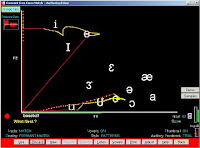
Speech Representation:  With the Formant Displays, which are helpful for articulation, you can choose to represent sounds in a matrix or cross-time (temporal) form. Matrix generally illustrates sound differences more effectively than temporal displays, but does not show durational differences as well. 
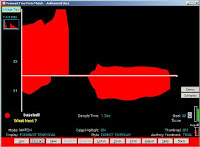
With the P-A-R (Pitch-Amplitude-Rhythm) displays, you can view the pitch or volume characteristic of any sound production. With both Formant and P-A-R models, you can switch between the two styles with a single mouse click.

Formant Matrix Vowel Chart: By default, vowel symbols will appear on the screen in the F2/F1 matrix display, identifying the general locations on the screen where different vowels generally appear. Dont want to see them at all? Click the Vowels button to turn the whole chart off and on. The default vowel symbols are IPA style; if you prefer standard "dictionary" symbols in the chart, make that change with the Formant Adjust button. 

Want to change the position of a vowel in the chart? Differences in speakers' production of vowel sounds can affect where they map on the screen. To change the position of any symbol, just click and drag it to the desired screen location. Don't want all the symbols to appear? Just click any symbol, drag it off the edge of the screen, and it will disappear. The new locations will be stored either in your therapist folder or in the individual's folder if one has been activated. This lets you customize the vowel chart to your own voice, or those of people in your caseload.
In the F2/F1 Gobble game, you can specify whether the vowels are "permanent," automatically refreshing when the Gobbler eats parts of them, or "erasable" and can be ''eaten up in the vocalizing process. This can be helpful if you're working on production of specific vowel sounds, and want the reward to be erasure of the symbols themselves. (Of course, the Gobbler's movement back to the corner of the voice space can cause parts of symbols to be erased without production of that sound, so use this cautiously!)

Performance Goal: Typically set to 80 by default, this control exists in most displays and determines the score needed to achieve an “Excellent” message and see a reward animation. You can raise or lower it at any time to make the display or game more or less demanding. If you change the performance goal in one display, that change automatically carries over to the other displays, too.

Reward Animations: There are two types of reward graphics. One is an animated cartoon that appears on the right side of the screen in pattern-match displays. The other is a box in the middle of the screen that contains a congratulatory message along with a colorful pattern; these rewards appear in many of the games. You can preview and select among the animated cartoons with the Adjust button in the Formant and P-A-R displays.

The game rewards are controlled through the Game Preferences button on the Fun & Games menu. (There you can also choose from among the many reward sounds, too.)
You can control whether rewards appear automatically when a production's score exceeds your performance goal, override Video Voice if you disagree with its assessment, or award all cartoon animations yourself. Use the Formant and P-A-R Adjust buttons, or the Game Preferences button on the Fun & Games menu, to access these settings.

Game Controls:  The Fun & Games options have a variety of adjustable controls. Some are common, shared across games, such as the Fade Speed (how fast a graphic disappears from the screen when the desired task isn't met) and Stop Sensitivity (how quickly Video Voice reacts to pauses in vocalization ). If you make a change to one of those common controls, it will apply to all games that have that adjustable option, too.  

Mostly, however, controls are specific to the individual games. Examples:

Pitch Painting, which provides a colorful display of pitch, has adjustable brush shapes and sizes that let you add visual variety to the feedback.  You can simply show varying pitch levels in speech, or choose only to reward vocalization with pitch above or below certain levels.

In Speech Ball, you can control how many balls will be in play in the game, the Speed at which they move, and the Hot Zone (area of the screen in which voicing will be detected).

With the Chat-N-U-Go Choo-Choo game, you can choose the game icon (antique or modern train, cars of different colors, or horse) and select from speech goals including more or less volume, vocal onset, or production of target sounds or individual words. Within any of the game goals, you have control over the performance required, speed of the game icon, and number or duration of vocalizations or trips required to complete the game, so you can make it easier or more demanding.

Likewise, Jumping Jack offers track events for work on volume control, duration, onsets and speaking rate. Each event has its own set of controls, such as running speed, vocalization time required, and amount of volume necessary for success.

The Bulls Eye! game lets you control which games appear in the menu. Although the little boys enjoy the bomb-dropping games and their explosions, some therapists prefer only the peaceable Care Packages and Flower Power games. With the Game Selection option, you can make the Battleships and Tanks A Lot games invisible and inaccessible. (This capability was added in response to a school district's non-violence requirement - we listen to our users!) You set the onset targets in all the Bulls Eye! games, and also can control the game speed.

The Voice-A-Sketch game has 78 built-in, high-quality pictures to choose from, but you can also use your own images if you wish. This makes it possible to tailor the graphic feedback to each individual's interests. Voice-A-Sketch also has multiple speech goal options, from simple continuous phonation or vocal onsets to volume control, duration, and word or sound articulation.

Personalized Audio and Display Text: Newly added to Video Voice is the ability to personalize the prompts for voicing and reward audios and messages that appear. The generic "Say" or "Very Good" messages can be replaced by "Mary, say..." or "Very good, Johnny!"  Modified audios and text can be stored in each individual's case folder, customizing the feedback for each person you work with. In the International/Simplified Operating mode, the prompts can even appear in other, non-Latin keyboard languages such as Arabic.

These are just some of Video Voice's displays and games, and controls that let you "Have it your way." Look around and explore the software to determine what works for best for you and is most motivating and effective with members of your caseload!  (If you don't already have Video Voice, download the program at www.videovoice.com and try it free for 30 days.  If you're already using it, you can make sure you're using the most up-to-date version, and download a no-charge update there.)

Yours in good speech,

Video Voice Support Team
mv@videovoice.com
1-800-537-2182
www.videovoice.com

Friday, November 11, 2011

More New Features, New Lower Price!

We haven’t posted recently. The reason is that we’ve been busy getting a new release of Video Voice out the door, and we’re pleased to report that Version 3.0.126 is now available for download at www.videovoice.com/vv_curel.htm.

This new version of the software has some great new features and capabilities, as well as numerous improvements to existing ones. And, Video Voice is now available at an even lower price!  Here are some of the noteworthy changes and additions.

Formant Spectral Display
Live F1/F2/F3 Spectral Display
The Formant Multi-Frequency Spectral display provides live feedback on the F1, F2 and F3 frequencies in speech. Previously released in preliminary form, it has now been completely revamped. In addition to smoother display of data, you can now capture "traces" to use as models for sound practice.

The immediate feedback in this display can be very helpful for work on ‘R’ vs ‘OO’ and discrimination of high frequency sounds like ‘S’ and ‘SH’. Give this one a try! (Formant Menu - F3/F2/F1 Multi-Frequency-Spectral) We’ll be back to talk more about using the Spectral display in an upcoming  post, but for now we just wanted to let you know there have been some big changes in that display.

Customized Audio
Version 3.0.126 lets you personalize operation with your own audio recordings of voice prompts, congratulatory messages, and other vocal feedback. Your voice can be the one in prompts for voice production ("Say [target]") and reward messages, and they can be in whatever language you use or prefer. Explore this new capability through the Configuration Menu-Auditory-Feedback options.

New Voice Prompt
Video Voice now indicates readiness for voice input in many games and displays with the prompt "Speak now."  This audio help the speaker know when Video Voice starts "listening," and it's time to turn his voice on.  "Speak now" is one of the prompts that you can customize to your voice.


Localization and Keyboard Language Support
Video Voice has always been "language-independent," even though the user interface is in English. The displays and audio recording don’t know what language is being spoken, just that sound is present. Sound is sound, and all languages of have frequencies that can be visually interpreted. (Okay, maybe not "San," the clicking language used by some African tribes, but they’re not likely to be much interested in using computers for speech practice...)  But speech work with Video Voice in other than English is certainly possible, and in fact the games and displays are being successfully used for speech development and remediation in many countries around the globe.

To support non-English use further, a few months back we introduced the International/Simplified operating mode. This streamlined mode will accept and display characters in all keyboard languages. (Authorized User and Free Trial support Latin-based keyboards only.) Want to show model names in prompts in Arabic, Greek, Cyrillic, Hebrew? No problem! However your keyboard is defined in Windows, Video Voice’s International/Simplified mode will handle it. This gives you the ability to display on-screen text such as user and model names, in the orthographics of your language. In this operating mode, however, data cannot be stored for reuse.

The International/Simplified mode also offers translations of buttons and controls on the therapy and game screens for Spanish and French languages.

The Authorized User and Free Trial modes do support non-English, Latin-based keyboards such as Spanish, French, Portuguese, German, Italian, etc. This means your model and user names can contain special, accented characters used in those languages.

Fluency Guide
For those people who work with fluency cases, there’s a new "Solutions" pdf document that offers suggestions on how to use the games and displays to reduce stuttering. (Find it on the Main Menu-Solutions-Fluency pdf)

Big Bad Bug Fix
Some users had reported a lock-up bug in some articulation games, particularly those that do model-matching. It was ugly, causing Video Voice to become unresponsive and require a restart. We’d seen the problem too, but just couldn’t reproduce it reliably. If you can’t make a failure happen in identifiable ways, it’s darned hard to fix. Kind of like when you take your car to the shop and report a strange noise, but of course it doesn’t make that noise so the mechanic can hear it! Anyway, we knew the problem was real, and battled it for several months, but believe we finally have it fixed. (I’m sure you’ll let us know if we haven’t, though!) We’ve made a number of other improvements in the articulation games, too.

New Lower Price!
In these hard economic times, things are tough all over, so we’re doing our part to make Video Voice even more affordable. We’ve reduced the price on all package configurations. To learn more, go to the Pricing page on our web site: www.videovoice.com/vv_price.htm

Why Download the Current Version?

If you’re already a Video Voice user, but haven’t downloaded a new copy of the software in a while, it’s really time to do that now, since there are many additions and major improvements! There’s no charge for software updates, so what are you waiting for?

If you’ve looked at Video Voice in the past, but didn’t make the decision to add this powerful tool to your speech therapy arsenal, it’s time to take another look! With the new games, displays and features to help you streamline your therapy results, it’s a shame not to give it another try. You may be able to start another Free Trial automatically, but if you need assistance with that, we’ll be happy to offer it.

We’ll be back soon with more details on some of these new features and some interesting stories, but for now, please check out this new version of Video Voice. Think you’ll like what you see!

Yours in good speech,

Video Voice Support Team
1-800-537-2182

mv@videovoice.com
www.videovoice.com